

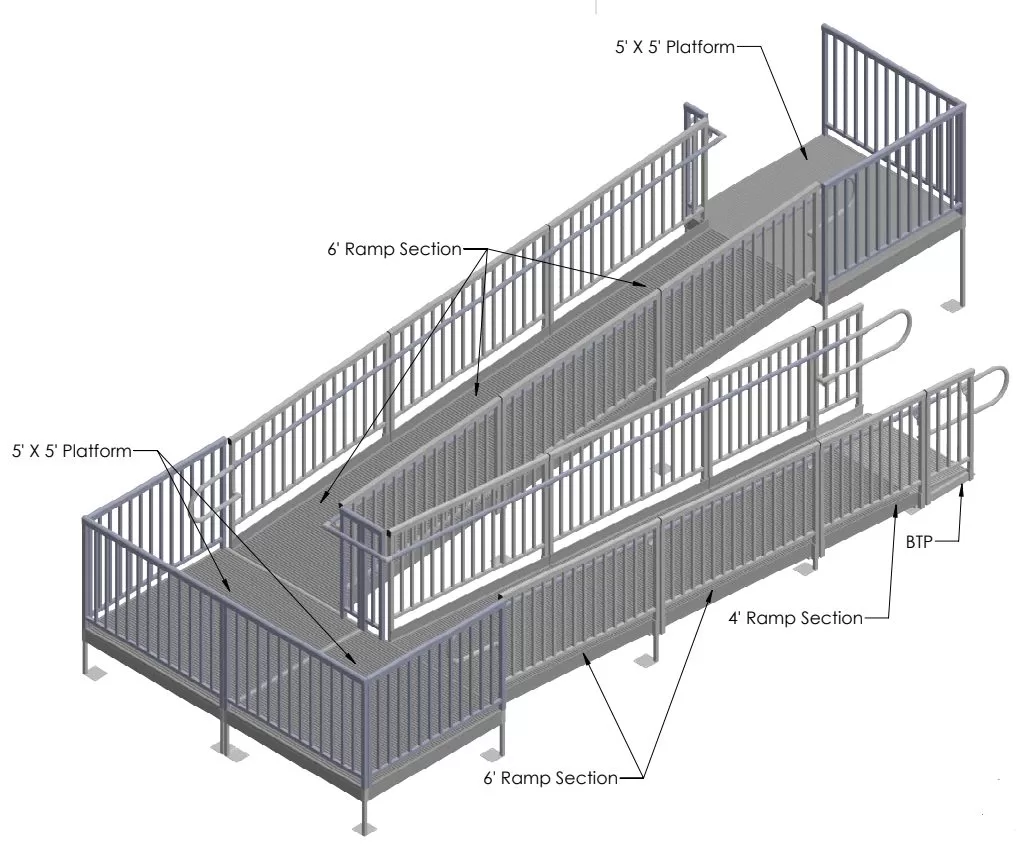
Why do CAD drawings and proactive wheelchair ramp design matter? The typical answers to that question would be accuracy and precision, but the advantages of CAD are far more extensive.
Manual sketching often fails to deliver the precise measurements, tolerances, and clear dimensions that CAD drawings allow. Utilizing CAD properly for your access ramp installation can offer significant benefits, such as helping to prevent costly on-site mistakes or time-consuming rework by validating parameters such as geometry and alignment in advance.
Detailed CAD drawings provide clear documentation for structural calculations, material specifications, and compliance reviews.
In many cases, detailed CAD drawings are required by municipal or building authorities for permit approval. CAD enables seamless integration of accessibility building codes, including ADA and OSHA, within the design, providing clear documentation for structural calculations, material specifications, and compliance reviews. Design constraints such as maximum access ramp slopes, widths, clearances, landing sizes, guardrail heights, and edge protections are automatically reviewed and verified, saving valuable time and manpower and ensuring a fully compliant installation.
Using CAD standards ensures consistency, interoperability, and reliable handoffs between the client and the design, fabrication, and construction teams.
CAD tools, like Solidworks, support accurate data exchange via DWG/DXF formats for consistent and accurate data exchange and interoperability between stakeholders. Providing a 3D model or rendering ensures all parties are aligned before ramp installation begins, as it allows for better coordination between designer, contractor, and client expectations by helping catch potential issues early. It also makes it easy to test multiple design options quickly, such as varying slopes, clearances, or overall ramp layouts, to determine which configuration best meets your needs.
CAD can incorporate topographic, site, and structural input so your wheelchair ramp meets real site topography.
Using a CAD model simultaneously facilitates modular designs, increasing flexibility and future-proofing your access ramp installation for later extensions, changes, or relocations, as well as serving as-built records for maintenance or repairs. Long-term, it’s useful for potential warranty claims and replacement needs.
As CAD can incorporate input on topography, site, and structure, including ground slopes and existing site grades, it helps ensure your access ramp conforms to the site topography. This aids in drainage and foundation work, as well as surrounding site elements.
By detecting clashes, interferences, or clearance issues ahead of construction, you reduce costly field changes.
By identifying issues early, potential problems can be addressed directly in the digital model, preventing project delays and the need for costly field modifications. This approach also ensures accurate material calculations and precise quantification, making it easier to plan and efficiently allocate resources, avoiding waste and unnecessary purchases.
As evidenced above, CAD has many uses and benefits, and when leveraged correctly, it becomes an essential tool for ensuring accuracy, efficiency, and compliance throughout your access ramp design and installation process.
Frequently Asked Questions
What are CAD drawings in ramp planning?
CAD drawings are digital blueprints that show a ramp’s exact slope, layout, and dimensions to ensure it meets ADA and local code requirements.
Do I need drawings to get ramp approval?
Often yes. Most cities require CAD or technical drawings for commercial ramps to verify compliance before issuing permits.
How does CAD improve ramp safety?
Accurate drawings help spot design issues early, ensuring proper slopes, handrails, and transitions for a safe, accessible ramp.
Don’t Risk Injury To You Or A Loved One
Why wait? Give us a call at 877-596-7293 or contact us online to get started!